6. 3D Web Map Client
Note
This is the documentation of the 3D Web Map Client version 2.0.
Starting from version 3.3.0, the 3DCityDB software package comes with a software package called 3DCityDB-Web-Map-Client (in this chapter we simply call it “3D web client”) acting as a web-based front-end for high-performance 3D visualization and interactive exploration of arbitrarily large semantic 3D city models. The 3D web client has been developed based on the Cesium Virtual Globe, which is an open source JavaScript library developed by Analytical Graphics, Inc. (AGI). It utilizes HTML5 and the Web Graphics Library (WebGL) as its core for hardware acceleration and provides cross-platform functionalities like displaying 3D graphic contents on the web without the needs of additional plugins.
While developing the 3D web client, various extensions have been made to the Cesium Virtual Globe in order to facilitate users to view and explore 3D city models conveniently. The key features and functionalities of the 3D web client version 2.0 is summarized as follows:
Support for efficient displaying, caching, prefetching, dynamic loading and unloading of large pre-styled 3D visualization models in the form of tiled KML/glTF datasets exported from the 3DCityDB using the Importer/Exporter
Intuitive user interface for adding and removing arbitrary number of data layers for 3D visualization (KML/glTF, GeoJSON, Cesium 3D Tiles, I3S), together with WMS/WMTS imagery layer, and Cesium digital terrain model
Support for linking the 3D visualization models (KML/glTF, GeoJSON, Cesium 3D Tiles, I3S) with external thematic data sources, such as Google Spreadsheets and PostgreSQL/PostgREST, allowing for querying the thematic data of every 3D object
Support for displaying the existing thematic data embedded within the visualization datasets, such as KML, GeoJSON, Cesium 3D Tiles and I3S
Support for rich interaction with 3D visualization models, for example, highlighting of 3D objects on mouseover and mouseclick as well as hiding and showing of multiple selected 3D objects
Support for exploring a 3D object of interest from different view perspectives using third-party mapping services like Microsoft Bing Maps with oblique view, Google Streetview, and a combined version (DualMaps)
Support for on-the-fly activating and deactivating shadow visualization of 3D objects and Cesium digital terrain models
Support for collaborative creation and sharing of the workspace of the 3DCityDB-Web-Map-Client by means of generating a scene link including information about the current camera perspective, activation status of the shadow visualization, parameters of the current loaded data layers, etc. This link can be easily shared or bookmarked, and can be reopened in a browser on different machines
Support for mobile devices (smartphones, tablets, etc.) with live tracking of geolocation and orientation
Packaged as a Docker image for fast and convenient deployment
For example, the KML/glTF models exported using the Import/Export tool can now be directly visualized along with imagery and terrain layers within a web browser using the 3D web client, which additionally can link the KML/glTF models with table data exported using the Spreadsheet Generator Plugin (SPSHG) and allows querying the thematic data of every city object.
With this newly introduced 3D web client, the functionalities of the 3DCityDB now range from high-efficient storage and management of virtual 3D city models according to the CityGML standard up to high-performance visualization and exploration of them on the web.
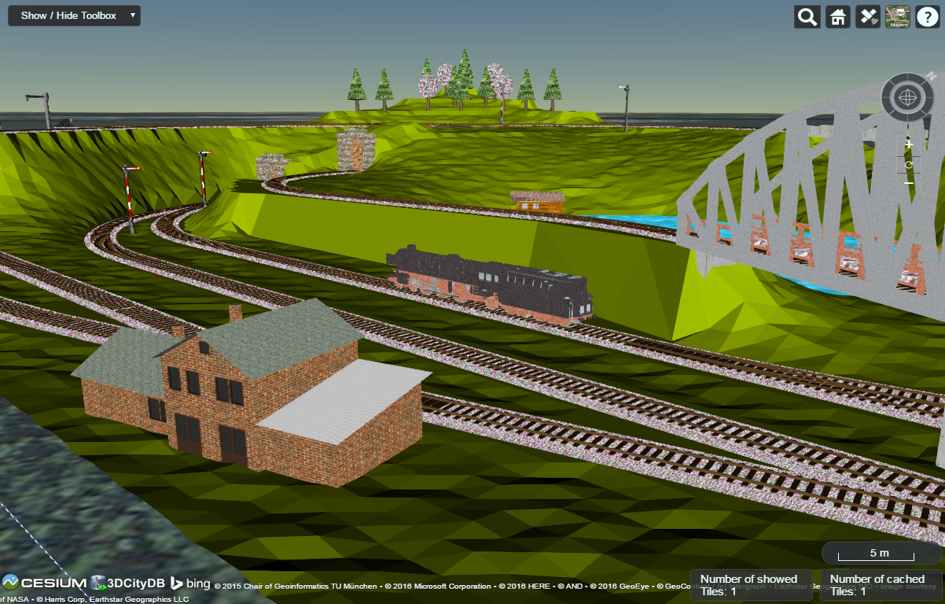
Fig. 6.30 Screenshot showing the example of displaying different CityGML top-level features (building, bridge, tunnel, water, vegetation, transportation etc.) in glTF format in the 3D web client